NestJS TypeScript 7: Fix nest build and Set Up tsc 7
nest build fails on TypeScript 7. Run tsc 7 beside TypeScript 6 to keep the Nest CLI, Swagger plugin and ts-jest working with fast type checks.


On this page
NestJS TypeScript 7 support is partial today: tsc 7 can type-check a Nest project, but nest build and nest start stop with an error when typescript resolves to 7.x, because the Nest CLI needs a compiler API that TypeScript 7.0 does not ship. The setup that works is to install both: TypeScript 6 under the name typescript for the Nest CLI, and TypeScript 7 under an alias for fast type checks.
The commands, errors and fixes below apply to @nestjs/cli 12.0.15, typescript 7.0.2 and the @typescript/typescript6 compatibility package.
Does NestJS support TypeScript 7?#
Not through the Nest CLI. TypeScript 7.0 is the native Go port of the compiler (previewed as tsgo), and its announcement says it does not ship with an API. The Nest CLI calls that API to read your tsconfig, compile, watch and run compiler plugins, so the open nest-cli tracking issue lists nest build, nest start and nest start --watch as blocked.
The framework itself is not the problem. TypeScript 7 compiles experimentalDecorators code and still emits the design:paramtypes metadata that Nest's dependency injection reads. The gap is in the tooling around the compiler.
How do you fix "does not expose the programmatic compiler API"?#
Put TypeScript 6 back under the package name typescript, either alone or through the side-by-side aliases in the next section. This is the error nest build and nest start print:
Error The installed TypeScript version (7.0.2) does not expose the programmatic compiler API that the Nest CLI requires. TypeScript 7.0 ships the "tsc" executable only; the compiler API is expected to return in 7.1. Please install TypeScript 6 (e.g. "npm i -D typescript@^6") until then.The quickest fix is the one in the message:
npm i -D typescript@^6pnpm add -D typescript@^6yarn add -D typescript@^6bun add -d typescript@^6If your project is coming from TypeScript 5, TypeScript 6 may reject your tsconfig next, so check the tsconfig fixes below.
Switching builders does not avoid the error. The CLI checks for the API at the point where it loads typescript, so -b swc, -b webpack and -b rspack stop with the same text. CLI releases that predate the check crash with tsBinary.getParsedCommandLineOfConfigFile is not a function instead.
You may hit npm before you hit Nest. On a NestJS 12 project, npm i -D typescript@^7 fails to install:
npm error code ERESOLVE
npm error ERESOLVE unable to resolve dependency tree
The npm output names the conflicting ranges, such as peer typescript@"^6.0.0" from @nestjs/schematics. @nestjs/swagger 12 also limits its peer range to TypeScript 5.5 or 6. Forcing the install with --legacy-peer-deps only moves the failure to nest build.
How do you set up NestJS TypeScript 7 side by side?#
Alias the @typescript/typescript6 package to typescript, and alias TypeScript 7 to @typescript/native. Tools that import typescript get the 6.0 API, while the tsc command runs TypeScript 7. These are the aliases Microsoft documents for tools that still need the old API.
Step 1. Install both packages with one command:
npm i -D "@typescript/native@npm:typescript@^7.0.2" "typescript@npm:@typescript/typescript6@^6.0.2"Your package.json now has:
{
  "devDependencies": {
    "@typescript/native": "npm:typescript@^7.0.2",
    "typescript": "npm:@typescript/typescript6@^6.0.2"
  }
}
Step 2. Check which compiler each command runs. tsc should report a 7.x version and tsc6 a 6.0.x version:
npx tsc -v
npx tsc6 -v
The package version of @typescript/typescript6 and the compiler version it prints can differ: package 6.0.2 can report compiler 6.0.3. If npx tsc -v shows 6.x, delete node_modules, reinstall and check again.
Step 3. Add a type-check script that uses TypeScript 7:
{
  "scripts": {
    "typecheck": "tsc -p tsconfig.json --noEmit",
    "build": "nest build",
    "start:dev": "nest start --watch"
  }
}
Step 4. Run it in CI before the build:
npm ci
npm run typecheck
npm run build
npm test
npm run typecheck is where you get the native speed. Microsoft reports that full builds are typically between 8x and 12x faster with TypeScript 7. nest build still compiles with TypeScript 6, so it gets no faster, and the default builder type-checks a second time. The SWC section below removes that duplicate work.
The same aliases work on NestJS 11 with @nestjs/cli 11, after two preparations. First, older tooling rejects TypeScript 6 as a peer dependency, so update ts-jest to 29.4.7 or later and typescript-eslint to 8.58.0 or later if you use them. Second, the NestJS 11 starter tsconfig sets baseUrl and no rootDir, and TypeScript 6 stops nest build on it, so apply the tsconfig changes below. If linting broke too, the typescript-eslint TS 7 fix uses this exact layout, so one change covers both.

Which NestJS build option should you pick?#
Pick the side-by-side setup with the default builder unless build time is a real problem. It keeps every Nest CLI feature. Move to SWC when builds are slow, and compile with plain tsc 7 only if your app uses no CLI plugins and no paths aliases.
Can you build NestJS with tsc 7 and skip the Nest CLI?#
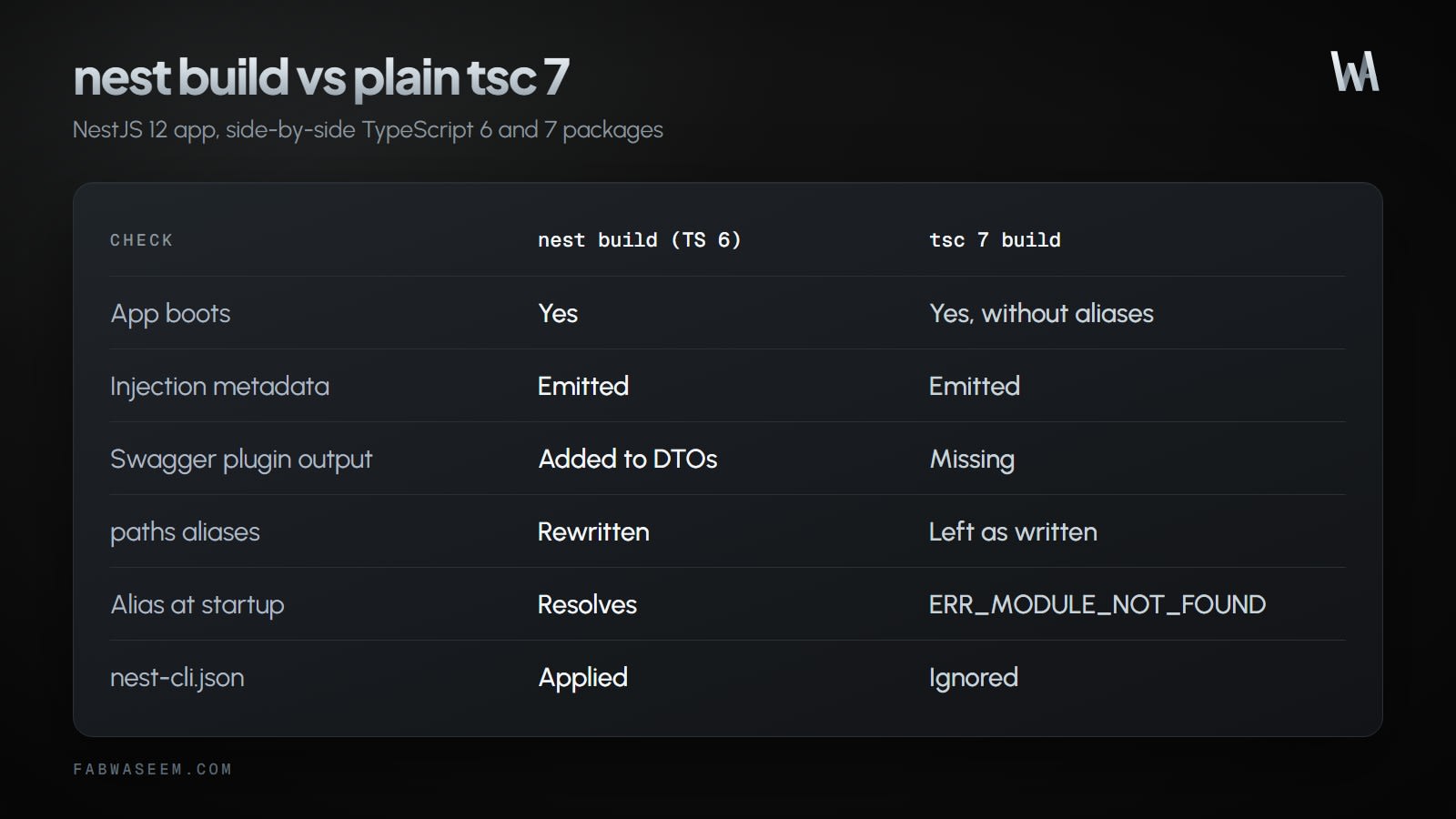
Yes, if you can live without CLI features. tsc -p tsconfig.build.json from TypeScript 7 compiles a Nest app that boots normally, but it never runs compilerOptions.plugins and does not rewrite paths aliases. With the side-by-side packages installed, only the scripts change (add npm i -D concurrently for watch mode):
{
  "scripts": {
    "build": "tsc -p tsconfig.build.json",
    "start:dev": "npm run build && concurrently \"tsc -p tsconfig.build.json --watch --preserveWatchOutput\" \"node --watch dist/main.js\""
  }
}
Use dist/src/main.js instead if your rootDir puts the output there. Check these three differences before you commit to it:
-
Swagger metadata disappears. With the
@nestjs/swaggerCLI plugin,nest buildadds a static_OPENAPI_METADATA_FACTORY()method to your DTO classes. Plaintscoutput has none, so the build succeeds and your OpenAPI schemas lose the properties the plugin would have described for you. -
Path aliases break at runtime.
nest buildrewrites an import such as@users/users.controller.jsinto a relative path.tscleaves it as written, and Node fails on startup:textError [ERR_MODULE_NOT_FOUND]: Cannot find package '@users/users.controller.js' imported from .../dist/app.module.js -
nest-cli.jsonis ignored. Settings such asassetsanddeleteOutDirbelong to the Nest CLI, so copy assets and cleandistin your own scripts. If you cleandist, also set"incremental": falseundercompilerOptionsintsconfig.build.json. With incremental builds on, the leftover.tsbuildinfofile makestsctreat the project as up to date, so it exits successfully and writes nothing.
How do you speed up nest build with SWC and tsc 7?#
Let SWC emit the JavaScript and let tsc 7 do the type checking. Keep the side-by-side packages, because the Nest CLI still needs the TypeScript 6 API to start, then install the SWC builder:
npm i -D @swc/cli @swc/corepnpm add -D @swc/cli @swc/coreyarn add -D @swc/cli @swc/corebun add -d @swc/cli @swc/coreFor an app without CLI plugins, merge these two keys into the compilerOptions of nest-cli.json:
{
  "compilerOptions": {
    "builder": "swc",
    "typeCheck": false
  }
}
Then chain the type check in front of the build:
{
  "scripts": {
    "typecheck": "tsc -p tsconfig.json --noEmit",
    "build": "npm run typecheck && nest build"
  }
}
SWC alone compiles files that contain type errors, so do not drop the typecheck step. In watch mode, run npx tsc --noEmit --watch in a second terminal.
Using the Swagger plugin with SWC#
Set "typeCheck": true and load the generated metadata yourself. With SWC the plugin does not rewrite your DTOs. Instead, the CLI type-checks with the TypeScript 6 API and writes src/metadata.ts, which main.ts has to pass to Swagger before creating the document:
import { NestFactory } from '@nestjs/core';
import { DocumentBuilder, SwaggerModule } from '@nestjs/swagger';
import { AppModule } from './app.module.js';
import metadata from './metadata.js';

async function bootstrap() {
  const app = await NestFactory.create(AppModule);
  await SwaggerModule.loadPluginMetadata(metadata);
  const config = new DocumentBuilder().build();
  SwaggerModule.setup('api', app, () =>
    SwaggerModule.createDocument(app, config),
  );
  await app.listen(process.env.PORT ?? 3000);
}
await bootstrap();
With the plugin, reverse the build script so the CLI regenerates the metadata before tsc 7 reads it. In the other order, a missing or outdated src/metadata.ts fails the type check and nest build never runs:
{
  "scripts": {
    "build": "nest build && npm run typecheck"
  }
}
Run npm run build once to create src/metadata.ts, then commit it. A standalone tsc 7 check on a fresh checkout otherwise fails with TS2307: Cannot find module './metadata.js'. After renaming or removing a DTO or controller, rebuild and commit the new file before CI runs typecheck. CommonJS projects drop the .js extensions and call bootstrap() without the top-level await.
SWC can also fail on circular imports. The Nest docs recommend a wrapper type such as Relation<Profile> for circular entity relations.
Which tsconfig options break NestJS on TypeScript 7?#
baseUrl, moduleResolution: node and settings that relied on old defaults are what break. TypeScript 6 changed the defaults for strict, rootDir and types and deprecated those two options; TypeScript 7 removes them. That means nest build on TypeScript 6 reports most of these problems too.
If your code imports paths such as src/users/... that only resolved through baseUrl, replace it with "paths": { "*": ["./*"] }.
ignoreDeprecations is not a way out. On TypeScript 6, baseUrl raises TS5101 and "ignoreDeprecations": "6.0" silences it, but TypeScript 7 still fails with TS5102. TypeScript 7 also rejects "target": "es5", "esModuleInterop": false, downlevelIteration and the amd, umd and systemjs module settings.
A tsconfig.json that covers all five rows looks like this. Merge these settings into your file rather than dropping the others it has:
{
  "compilerOptions": {
    "module": "nodenext",
    "moduleResolution": "nodenext",
    "target": "ES2023",
    "outDir": "./dist",
    "rootDir": ".",
    "strict": true,
    "strictPropertyInitialization": false,
    "types": ["node", "jest"],
    "experimentalDecorators": true,
    "emitDecoratorMetadata": true,
    "skipLibCheck": true
  }
}
Replace jest with vitest/globals if you use Vitest. tsconfig.build.json needs its own source root so that output stays at dist/main.js. The NestJS 11 starter has neither of these two settings, so add them:
{
  "extends": "./tsconfig.json",
  "compilerOptions": { "rootDir": "./src" },
  "include": ["src"],
  "exclude": ["node_modules", "test", "dist", "**/*spec.ts"]
}
For changes outside Nest, see the TypeScript 7 upgrade guide.
Does ts-jest work with TypeScript 7?#
Only through the alias. ts-jest 29.4.15 declares a peer range of typescript >=4.3 <7, and when typescript is 7.0.2 a test suite that it transforms fails to run with this message:
The TypeScript compiler "typescript" (version 7.0.2) does not expose the JavaScript compiler API required by ts-jest. To use TypeScript 7 for project type-checking, install it as "@typescript/native" and alias "@typescript/typescript6" as "typescript" for ts-jest.Run the install command from step 1 and ts-jest compiles through the TypeScript 6 API again. NestJS 12 projects created by nest new can use Vitest instead; the NestJS 12 migration guide compares Jest and Vitest on v12 and shows how to keep an existing Jest suite running.
Will TypeScript 7.1 fix nest build?#
Not by itself. TypeScript 7.1 brings a new API under entry points such as typescript/sync, and the Nest CLI has to be changed to use it. With typescript@7.1.0-beta installed, CLI 12.0.15 prints the same "does not expose the programmatic compiler API" error, including the line saying the API is expected in 7.1.
The work in progress is nest-cli pull request 3554, which is open and unmerged. As proposed:
- It adds one-shot
nest buildsupport for thetscbuilder on TypeScript 7.1. - Watch mode is left for a follow-up pull request.
compilerOptions.pluginsandpathsstop the build with an error, because the new emit API accepts no custom transformers.- SWC with
typeCheck, webpack and Rspack still require the old API.
The 7.1 iteration plan lists the release candidate for December 1, 2026 and the stable release for a day in December that is not yet set. If your app relies on the Swagger or GraphQL plugin, plan to keep the side-by-side setup past the 7.1 release. See TypeScript 7.1 beta features for the rest of that release.
Key takeaways#
nest buildandnest startfail whentypescriptis 7.x, with the SWC, webpack and Rspack builders too.- Alias
@typescript/typescript6astypescriptand TypeScript 7 as@typescript/native; thentscis 7 and the Nest CLI and ts-jest keep the 6.0 API. - Run
tsc7 as a separate type-check step, and add SWC if the build itself is slow. - Building with plain
tsc7 drops CLI plugin metadata and leavespathsaliases unresolved. - Remove
baseUrl, setrootDirandtypes, and move offmoduleResolution: node. - TypeScript 7.1 alone does not unblock the Nest CLI; watch the open pull request.
Questions
Share this guide
Comments
No comments yet. Questions, corrections and your own results are all welcome.
Be kind and stay on topic. No name needed: leave it blank and you post under an anonymous name that stays yours. Links get
nofollow; spam is removed. Your email is never shown and is only used for reply notifications you ask for. Privacy