Nest Can't Resolve Dependencies: Every Cause and Fix in NestJS 12
The "Nest can't resolve dependencies of the X (?)" error has six common causes. Read the exact wording, find yours in the table and apply the fix, with NestJS 12 messages and working code.

On this page
The Nest can't resolve dependencies error means NestJS looked for a provider to inject into a constructor and found none in the module that declares the class. It is almost always a one-line fix: export the provider, import its module, switch an import type to a normal import, or break a circular import. The exact wording of the message tells you which one you have.
This guide uses the real messages printed by NestJS 12.6 and shows each cause with the smallest working fix, so you can match your error text and move on. NestJS 12 itself is covered in the NestJS 12 upgrade guide.
What does "Nest can't resolve dependencies" mean?#
It means Nest could not build a provider because one constructor argument has no matching provider in that provider's own module. Every @Module() has its own injection context, so a class can only receive providers that are declared in its module or exported by a module it imports. The (?) stands for the argument Nest could not resolve, and [0] is its position in the constructor.
NestJS 12.6 prints this when a service is missing:
Nest can't resolve dependencies of the UsersService (?). Please make sure that the argument EmailService at index [0] is available in the UsersModule module.

Potential solutions:
- Is UsersModule a valid NestJS module?
- If EmailService is a provider, is it part of the current UsersModule?
- If EmailService is exported from a separate @Module, is that module imported within UsersModule?
Read three things in it: the provider that failed (UsersService), the argument (EmailService, index 0) and the module (UsersModule). The fix always happens in the module named at the end, or in the module that should supply the argument.
Which error message do you have?#
Nest prints two different variants, and they point at different causes. Check whether the message names the missing token.
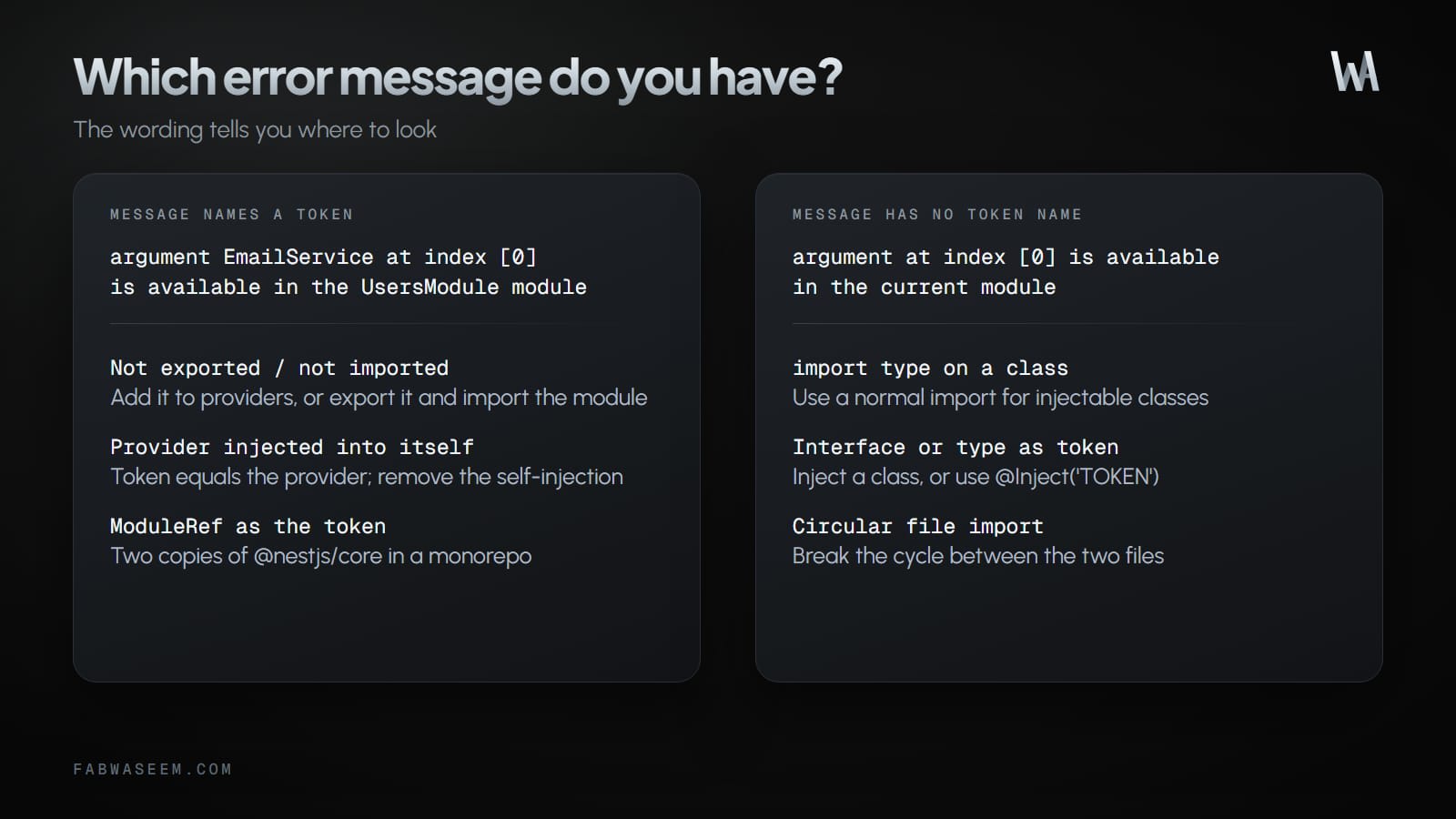
A repository, Prisma or Mongoose model, or a provider from a forRoot() module follows the first row: see the dynamic module section.
How do I fix a provider that is not exported or imported?#
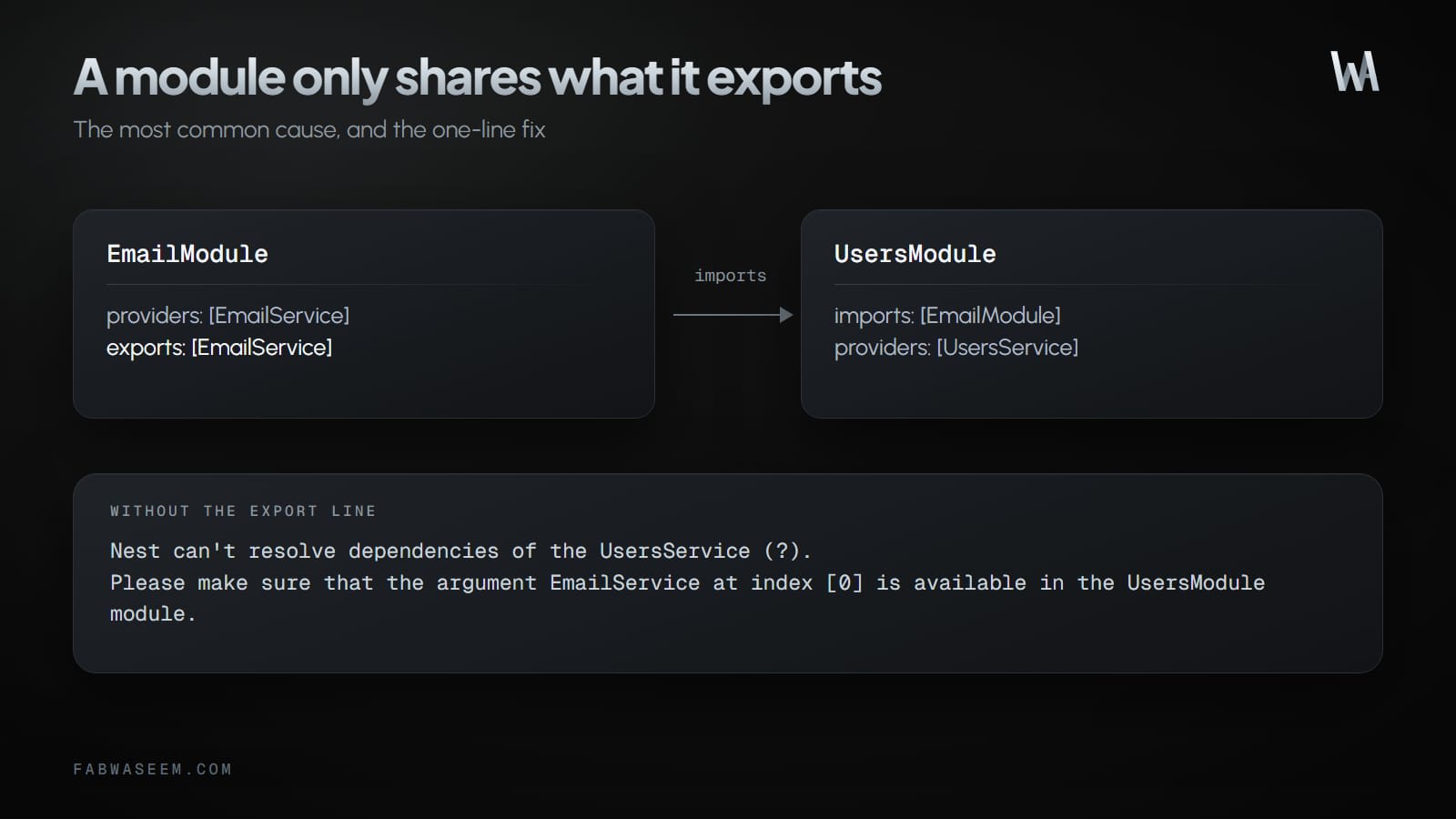
Export the provider from the module that declares it, then import that module where the provider is needed. A module that lists a service in providers keeps it private until it also lists it in exports, and importing the module does not change that. This is the cause behind most reports of this error.
// email.module.ts
import { Module } from '@nestjs/common'
import { EmailService } from './email.service'

@Module({
  providers: [EmailService],
  exports: [EmailService], // without this line UsersModule cannot see it
})
export class EmailModule {}

// users.module.ts
import { Module } from '@nestjs/common'
import { EmailModule } from '../email/email.module'
import { UsersService } from './users.service'

@Module({
  imports: [EmailModule],
  providers: [UsersService],
})
export class UsersModule {}
Two related mistakes give the same message:
- The provider's module is not in
importsat all. Packages such as JWT or config work the same way: import their module so the services it exports become visible. - Declaring the provider twice. If the same class is also listed in the
providersof another module, that copy needs its own dependencies in that module, and the error names the second module. Keep one declaration and import its module everywhere else.
If many modules need the same provider, mark its module with @Global() and import it once in the root module. The global module must still list the provider in exports:
@Global()
@Module({ providers: [EmailService], exports: [EmailService] })
export class CoreModule {}
Use it sparingly, because it hides which module depends on what. The Nest modules docs describe both options.
Putting an @Injectable() class in the imports array is a different error, and a clear one: Nest throws at startup, says the class cannot appear in the imports array of a module, and tells you to move it to providers.
Why does a repository or forRoot provider not resolve?#
Because a provider created by forRoot(), forFeature() or register() exists only in modules that include that dynamic module, and only if it is exported. A repository, a Prisma service or a Mongoose model is registered by an ORM or database module, so a feature module that injects it must import the module that provides it.
The fix has the same shape as before:
- Import the module that registers the provider into the feature module that injects it, for example the ORM's
forFeature()call or your ownPrismaModule. - Make sure that module lists the provider in
exports. - For a dynamic module you write yourself, return
exportsfromforRoot(), or setglobal: trueso other modules see the provider without importing it.
The message looks identical to the missing-export case, so apply the debugging steps below to find which module is missing the import.
Why does a custom token fail to resolve?#
A string or symbol token needs a matching provider with the same token. If a class asks for @Inject('CONFIG') and no provider uses provide: 'CONFIG' in a reachable module, Nest names the token in quotes:
Nest can't resolve dependencies of the TokenConsumer (?). Please make sure that the argument "CONFIG" at index [0] is available in the TokenModule module.Register the provider and export it the same way as any class provider:
@Module({
  providers: [{ provide: 'CONFIG', useValue: { region: 'eu' } }],
  exports: ['CONFIG'],
})
export class ConfigModule {}
Check for a typo first: 'CONFIG' and 'Config' are different tokens. Constants shared between the provider and the @Inject() call avoid that. See custom providers for the token types Nest accepts.
Can a provider inject itself?#
No. When the missing argument has the same name as the failing provider, the class has itself in its constructor:
@Injectable()
export class Selfie {
  constructor(private readonly self: Selfie) {} // error: argument Selfie at index [0]
}
Remove the self-injection, or split the shared logic into a second provider that both can use.
Why is ModuleRef the missing argument in a monorepo?#
If the missing argument is ModuleRef, your project probably loads two copies of @nestjs/core. This happens in monorepos when a Nest package such as @nestjs/bull ends up with its own nested @nestjs/core next to the one at the root. According to the NestJS docs, the fix depends on your package manager:
- Yarn workspaces: use the
nohoistfeature so@nestjs/coreis not hoisted. - pnpm workspaces: declare
@nestjs/coreas a peer dependency of the other package, and set"dependenciesMeta": { "other-module-name": { "injected": true } }in thepackage.jsonof the app that imports it.
Run pnpm why @nestjs/core (or npm ls @nestjs/core) to confirm you have more than one version before changing anything.
What does "appears to be undefined at runtime" mean?#
It means the class Nest read from the constructor was undefined or Object when the module was built, so there was no token to look up. NestJS 12.6 prints this variant without a token name:
Nest can't resolve dependencies of the NotifyService (?). Please make sure that the argument at index [0] is available in the current module.

Potential solutions:
- The dependency at index [0] appears to be undefined at runtime
- This commonly occurs when using 'import type' instead of 'import' for injectable classes
There are three causes, and they are quick to tell apart:
-
import typeon an injectable class. The import is erased, so the constructor type does not exist at runtime. Changeimport type { EmailService } from './email.service'toimport { EmailService } from './email.service'. WithverbatimModuleSyntaxorconsistent-type-importslint rules, mark only real types as type imports. -
An interface or type alias as the argument. Interfaces vanish at compile time, so Nest has nothing to use as a token. Inject a class instead, or give the dependency a token and use
@Inject():tsexport interface Mailer { send(to: string): Promise<void> } export const MAILER = Symbol('MAILER') // module: providers: [{ provide: MAILER, useClass: SmtpMailer }] constructor(@Inject(MAILER) private readonly mailer: Mailer) {} -
Two files that import each other. If
a.tsimportsb.tsandb.tsimportsa.ts, one of them seesundefinedwhile loading. A typical case is a module file that exports a token constant, imported by a provider that the same module file imports. Move the constant to its own file. Barrel files (index.ts) are another common hidden cause, so import the class from its own file inside the same folder.
How do I fix a circular dependency?#
Remove the cycle if you can, and use forwardRef() on both sides if you cannot. A cycle means provider A needs B and B needs A, or module A imports module B and module B imports module A. The simplest fix is to move the shared logic into a third provider that both depend on.
When the cycle is real, wrap both references:
import { Inject, Injectable, forwardRef } from '@nestjs/common'

@Injectable()
export class CatsService {
  constructor(
    @Inject(forwardRef(() => CommonService))
    private readonly commonService: CommonService,
  ) {}
}

@Injectable()
export class CommonService {
  constructor(
    @Inject(forwardRef(() => CatsService))
    private readonly catsService: CatsService,
  ) {}
}
For modules, use forwardRef(() => OtherModule) inside imports on both modules. Both sides need it: with only one, Nest cannot finish building the metadata.
One NestJS 12 detail: its packages are ES modules, and in an ESM build a plain module cycle fails before Nest starts. Two modules that import each other without forwardRef throw this from Node itself:
ReferenceError: Cannot access 'AModule' before initializationPutting forwardRef(() => AModule) in BModule and forwardRef(() => BModule) in AModule resolves it. In a CommonJS setup the same mistake shows up as Nest's own The module at index [0] of the "imports" array is undefined message instead. The circular dependency docs also describe a ModuleRef alternative and warn against barrel files for modules and providers.
How do I fix this error in a NestJS unit test?#
Add the missing provider to the testing module, or replace it with a mock. Test.createTestingModule builds a module that contains only what you list, so a service with a dependency fails with RootTestModule in the message:
Nest can't resolve dependencies of the UsersService (?). Please make sure that the argument EmailService at index [0] is available in the RootTestModule module.Provide a stand-in for the dependency:
import { Test } from '@nestjs/testing'

const moduleRef = await Test.createTestingModule({
  providers: [
    UsersService,
    { provide: EmailService, useValue: { send: () => 'mock' } },
  ],
}).compile()

const users = moduleRef.get(UsersService)
This is the pattern from the Nest testing docs. If the dependency has its own dependencies, mocking it with useValue avoids pulling the whole chain into the test. For choosing a runner, see Vitest vs Jest vs node:test.
Why is my injected service undefined with no error at all?#
Because Nest reads constructor types from decorator metadata, and some tools do not emit it. When metadata is missing, the argument is simply undefined and Nest raises no resolve error. The first sign is a later crash such as:
TypeError: Cannot read properties of undefined (reading 'send')Two situations produce it:
- A class without a decorator. A provider class that has no
@Injectable()(or other decorator) gets no parameter metadata, so its constructor arguments are not injected. - A runner that does not emit decorator metadata. A Nest app run through
tsxstarts without errors, yet constructor-injected services areundefined, because esbuild does not emit decorator metadata. Compile withtscor the Nest CLI, or use a build tool that supportsemitDecoratorMetadata, and keepexperimentalDecoratorsandemitDecoratorMetadataenabled intsconfig.json. The officialtypescript-startertsconfig enables both.
If you only need an injected value to exist, @Inject(EmailService) on the parameter gives Nest the token explicitly and works without emitted metadata.
Two more notes for edge cases. A provider with request scope makes every class that injects it request-scoped too, so a singleton that suddenly behaves per request may be inheriting scope; see the injection scopes docs. And if a dependency is genuinely optional, mark that parameter with @Optional() so Nest injects undefined instead of failing.
How do I debug it step by step?#
Work through the message from left to right, then confirm with Nest's own logging:
- Copy the three names: failing provider, argument and module.
- Open the named module. Is the provider in
providers, or is its module inimports? - Open the module that should supply it. Is the provider in
exports? - If no token name is shown, check for
import type, interfaces and circular file imports. - If the token is
ModuleRef, check for duplicate@nestjs/corecopies. - Set the
NEST_DEBUGenvironment variable to any non-empty string and start the app again. Nest then logs the host class being injected, the dependency name or token, and the module it searches, so you can trace where resolution stops. - In a test, add the provider or a mock to
createTestingModule.
For larger apps, Nest Devtools can help you resolve the error by showing the module graph. The official common errors page lists the same causes. If you are building a Nest API from scratch, my secure NestJS and Prisma starter shows a module layout where each feature exports only its public service, and the NestJS rate limiting guide wires a guard through the same module rules.
Key takeaways#
- The error means a constructor argument has no provider in the declaring module's context. Read the provider, argument and module names in the message.
- A named token usually means the provider is not in
exportsor its module is not inimports. Fix it with one line in the module. - "Appears to be undefined at runtime" means
import type, an interface used as a token, or a circular file import. - Circular dependencies need
forwardRefon both sides; in an ES module build a plain cycle throws aReferenceErrorfirst. - A missing
ModuleRefpoints to two copies of@nestjs/corein a monorepo. - In tests, provide the dependency or mock it with
{ provide, useValue }. - If injected services are silently
undefined, the compiler or runner is not emitting decorator metadata. - Set
NEST_DEBUGto see which module Nest searched for each dependency.
Questions
Share this guide
Comments
No comments yet. Questions, corrections and your own results are all welcome.
Be kind and stay on topic. No name needed: leave it blank and you post under an anonymous name that stays yours. Links get
nofollow; spam is removed. Your email is never shown and is only used for reply notifications you ask for. Privacy