How to Build RAG with pgvector and the AI SDK in TypeScript
Build a RAG pipeline in one Postgres database: chunk documents, embed them with the AI SDK, store vectors in pgvector, and retrieve with cosine distance and an HNSW index.

On this page
You can build RAG with pgvector in a single Postgres database: split your documents into chunks, turn each chunk into a vector with the AI SDK's embedMany, store the vectors in a vector(1536) column, and fetch the nearest chunks with the <=> cosine distance operator before calling generateText. No separate vector database is needed for most apps, and the whole pipeline fits in about 80 lines of TypeScript.
This guide walks through the schema, the indexing code, the retrieval query, chunking, re-indexing and the settings that change result quality. If you are still deciding where vectors should live, read pgvector vs Pinecone vs Qdrant first.
How does RAG with pgvector work?#
Retrieval-augmented generation (RAG) gives a language model the right facts at question time instead of hoping it memorized them. The pipeline has two phases:
- Index time. Split documents into chunks, embed every chunk, and store text plus vector in Postgres.
- Query time. Embed the user's question with the same model, find the nearest chunks by cosine distance, and pass them to the model as context.
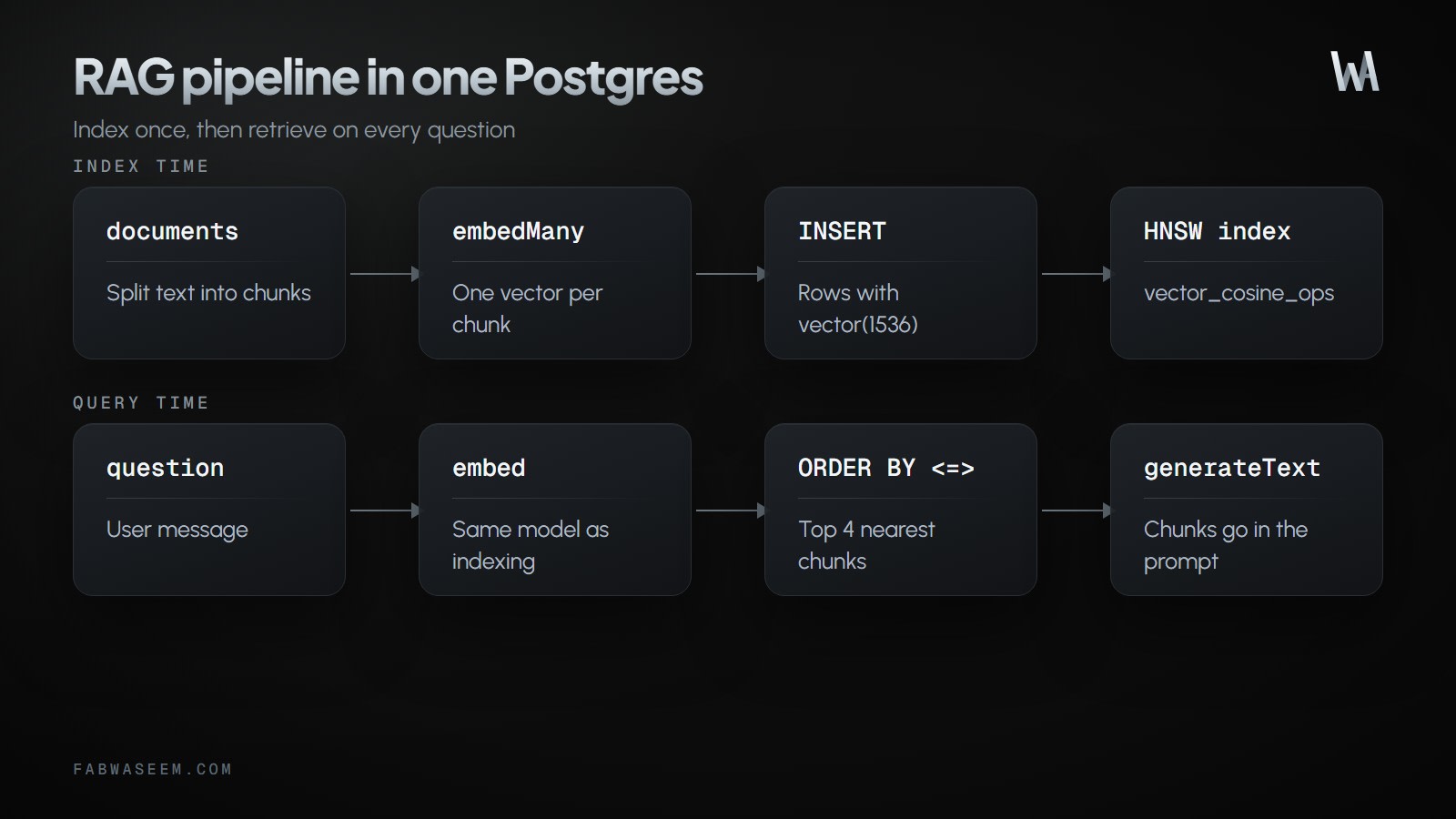
The pgvector extension adds a vector column type and distance operators to Postgres. Its README lists <=> as the cosine distance operator, and cosine similarity is 1 - (embedding <=> query).
How do you set up Postgres with pgvector?#
pgvector publishes Docker images that add the extension to the official Postgres image, for example pgvector/pgvector:pg18-trixie. Start a container, then enable the extension once per database:
docker run -d --name rag-db -e POSTGRES_PASSWORD=postgres -p 5432:5432 pgvector/pgvector:pg18-trixiePoint the app at it with a .env file:
DATABASE_URL=postgresql://postgres:postgres@localhost:5432/postgres
AI_GATEWAY_API_KEY=your-keyCREATE EXTENSION IF NOT EXISTS vector;
CREATE TABLE chunks (
id bigserial PRIMARY KEY,
source text NOT NULL,
content text NOT NULL,
embedding vector(1536) NOT NULL
);
CREATE INDEX chunks_embedding_idx
ON chunks USING hnsw (embedding vector_cosine_ops);The column size must match your embedding model. OpenAI's text-embedding-3-small returns 1536 dimensions by default, which is why the column is vector(1536). The hnsw index with vector_cosine_ops speeds up cosine searches; without it, Postgres scans every row, which is exact but slow on large tables. For a big initial load, insert the data first and create the index afterwards, because the pgvector README notes that building the index after loading is faster.
How do you chunk and embed documents with the AI SDK?#
The AI SDK exposes embedMany for batches and embed for a single value. The docs examples pass a model string such as 'openai/text-embedding-3-small'; set AI_GATEWAY_API_KEY for that form. You can also pass a provider model like openai.embedding('text-embedding-3-small') from @ai-sdk/openai with an OpenAI key. embedMany returns embeddings in the same order as the input values.
Install the packages:
npm install ai pg
npm install -D @types/pg
pnpm add ai pg
pnpm add -D @types/pgyarn add ai pg
yarn add -D @types/pgbun add ai pg
bun add -d @types/pgThen write the indexing side. Chunking here splits on blank lines and merges paragraphs up to a size limit, which keeps related sentences together. A paragraph longer than the limit is cut into fixed-size pieces:
import { embed, embedMany, generateText } from 'ai';
import { Pool } from 'pg';

const pool = new Pool({ connectionString: process.env.DATABASE_URL });
const EMBEDDING_MODEL = 'openai/text-embedding-3-small';

// pgvector accepts vectors as text like '[0.1,0.2,...]'
const toSql = (v: number[]) => `[${v.join(',')}]`;

export function chunkText(text: string, maxChars = 800): string[] {
  const chunks: string[] = [];
  let current = '';
  const flush = () => {
    if (current) chunks.push(current);
    current = '';
  };

  for (const para of text.split(/\n{2,}/).map((p) => p.trim()).filter(Boolean)) {
    if (para.length > maxChars) {
      flush();
      for (let i = 0; i < para.length; i += maxChars) {
        chunks.push(para.slice(i, i + maxChars));
      }
    } else if (current && current.length + para.length > maxChars) {
      flush();
      current = para;
    } else {
      current = current ? `${current}\n\n${para}` : para;
    }
  }
  flush();
  return chunks;
}

export async function indexDocument(source: string, text: string) {
  const chunks = chunkText(text);
  const { embeddings } = await embedMany({
    model: EMBEDDING_MODEL,
    values: chunks,
  });

  for (const [i, content] of chunks.entries()) {
    await pool.query(
      'INSERT INTO chunks (source, content, embedding) VALUES ($1, $2, $3::vector)',
      [source, content, toSql(embeddings[i])],
    );
  }
}
For large corpora, send chunks to embedMany in batches and use its maxParallelCalls option to limit concurrent requests.
How big should chunks be?#
There is no universal number, but a few hundred to roughly a thousand characters per chunk is a common starting range. Chunks that are too small lose the surrounding context, and chunks that are too large dilute the match and waste prompt tokens. Prefer natural boundaries such as paragraphs or Markdown headings over fixed character counts, and store a source value so answers can cite where a fact came from. Re-test whenever you change the size, because the right value depends on your documents.
How do you retrieve the most relevant chunks?#
Embed the question with the same model, then order by cosine distance. Put the operator directly in ORDER BY so Postgres can use the HNSW index. To drop weak matches, wrap the ordered query in a subquery and filter the similarity outside it; a bare WHERE on the similarity expression would stop the index from serving the sort:
export async function retrieve(question: string, limit = 4, minSimilarity = 0.5) {
  const { embedding } = await embed({
    model: EMBEDDING_MODEL,
    value: question,
  });

  const { rows } = await pool.query(
    `SELECT * FROM (
       SELECT source, content, 1 - (embedding <=> $1::vector) AS similarity
       FROM chunks
       ORDER BY embedding <=> $1::vector
       LIMIT $2
     ) nearest
     WHERE similarity >= $3`,
    [toSql(embedding), limit, minSimilarity],
  );
  return rows as { source: string; content: string; similarity: number }[];
}
The official AI SDK RAG guide uses the same idea with Drizzle: a similarity threshold of 0.5 and the top 4 results. Both numbers are starting points. Log the similarity of real queries and tune them against your own documents.
How do you answer the question with the retrieved context?#
Pass the chunks to generateText and tell the model to stay inside them:
export async function answer(question: string) {
  const chunks = await retrieve(question);
  const context = chunks.map((c) => `[${c.source}]\n${c.content}`).join('\n\n');

  const { text } = await generateText({
    model: 'anthropic/claude-sonnet-5-5', // use any chat model you prefer
    system:
      'Answer using only the context. If the context does not contain the answer, say you do not know. Cite sources in brackets.',
    prompt: `Context:\n${context}\n\nQuestion: ${question}`,
  });
  return text;
}
Using it end to end takes two calls:
await indexDocument('pricing.md', pricingMarkdown);
console.log(await answer('How much does the Pro plan cost?'));
If you want the model to decide when to search, expose retrieve as a tool instead. The official guide does this with a getInformation tool, and the model calls it only when a question needs the knowledge base. The AI SDK 7 migration guide covers the current tool and streaming APIs.
How do you update or re-index a document?#
Embeddings are derived data, so re-indexing is delete-then-insert. Do both in one transaction so readers never see a half-indexed document:
export async function reindexDocument(source: string, text: string) {
  const chunks = chunkText(text);
  const { embeddings } = await embedMany({ model: EMBEDDING_MODEL, values: chunks });

  const client = await pool.connect();
  try {
    await client.query('BEGIN');
    await client.query('DELETE FROM chunks WHERE source = $1', [source]);
    for (const [i, content] of chunks.entries()) {
      await client.query(
        'INSERT INTO chunks (source, content, embedding) VALUES ($1, $2, $3::vector)',
        [source, content, toSql(embeddings[i])],
      );
    }
    await client.query('COMMIT');
  } catch (err) {
    await client.query('ROLLBACK');
    throw err;
  } finally {
    client.release();
  }
}
Embedding happens before the transaction opens, so the database lock is held only for the quick writes. If you switch embedding models, re-embed everything: vectors from different models are not comparable.
Which pgvector settings affect RAG quality?#
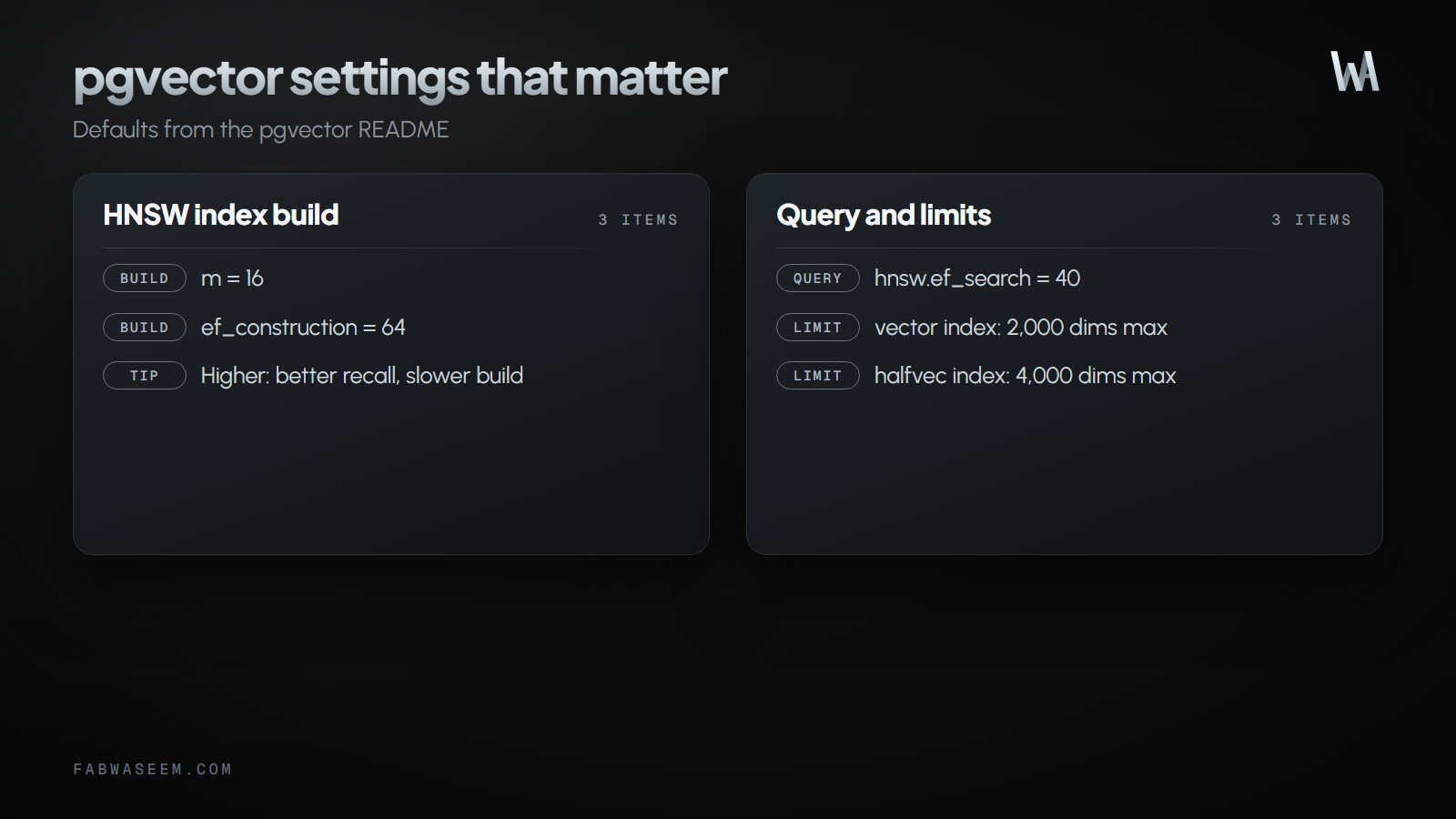
Three settings from the pgvector README matter most:
Two limits to plan around: a vector column can be indexed up to 2,000 dimensions, and halfvec up to 4,000. If you pick a 3072-dimension model, store the column as halfvec(3072), cast with ::halfvec in your queries and use the halfvec_cosine_ops operator class on the index. Alternatively, request fewer dimensions from the embedding model through its provider options.
Filtering is the other common trap. A WHERE clause such as WHERE source = 'docs' is applied after the approximate index scan, which can return fewer rows than expected. pgvector 0.8.0 added iterative index scans for this: enable them with SET hnsw.iterative_scan = strict_order; (or relaxed_order).
Should you add keyword search too?#
Vector search finds meaning but can miss exact tokens such as error codes, product names and SKUs. Many production systems combine vectors with Postgres full-text search and merge the two result lists. The trade-offs of Postgres text search are covered in Postgres full-text search vs Elasticsearch.
Key takeaways#
- One Postgres database with pgvector is enough for most RAG apps; add a dedicated vector store only when scale demands it.
- Use
embedManyto index chunks andembedfor the question, with the same model both times. - The column dimension must match the model: 1536 for
text-embedding-3-small. - Create an HNSW index with
vector_cosine_opsand keep<=>directly inORDER BY. - Start with the top 4 chunks, tune the similarity threshold on real questions, and raise
hnsw.ef_searchif recall is low. - Re-index a document by deleting its rows and inserting the new ones in one transaction.
- Use iterative index scans when you filter by metadata, and consider keyword search for exact terms.
Sources#
Questions
Share this guide
Comments
No comments yet. Questions, corrections and your own results are all welcome.
Be kind and stay on topic. No name needed: leave it blank and you post under an anonymous name that stays yours. Links get
nofollow; spam is removed. Your email is never shown and is only used for reply notifications you ask for. Privacy