Zod vs Valibot vs ArkType for MCP Tool Schemas
The MCP TypeScript SDK v2 takes any Standard Schema. I tried the same tool in Zod, Valibot and ArkType and compared the JSON Schema, errors, speed and cold start.

On this page
When I built the NestJS MCP server earlier this week, I used Zod for the tool schemas without thinking about it, because every SDK example does. Then I noticed the v2 TypeScript SDK types inputSchema as "any Standard Schema that can also emit JSON Schema", and the docstring names Zod 4, Valibot and ArkType. So today I wrote the same tool schema in all three, registered them on one MCP server, and measured what actually changes.
Short version: all three work. The differences that mattered were in the JSON Schema the model sees, how each one treats a datetime with a +05:00 offset, cold start, bundle size, and one ArkType setting that made the same schema about 18x slower.
What I ran#
Everything is on one shared 8 vCPU Xeon VM with 16 GB, on November 7, 2026:
- Node.js 24.22.1
zod4.6.7,valibot1.5.0 with@valibot/to-json-schema1.8.0,arktype2.2.9@modelcontextprotocol/serverand@modelcontextprotocol/client2.4.0, connected withInMemoryTransporttinybench6.2.3 for the parse numbers,esbuild0.28.2 for bundle sizes
Load average sat around 0.7 to 1.7 during the runs. It's a shared box, so treat the numbers as relative, not absolute.
One tool, three schemas#
The tool is a create_task with a title, optional body, a priority enum with a default, a tag list with a default, an optional due date and an optional assignee email. That's roughly what my real tools look like: a few strings with limits, an enum, an array, and two formats.
import * as z from "zod";

export const zodTask = z.object({
  title: z.string().min(1).max(120),
  body: z.string().max(5000).optional(),
  priority: z.enum(["low", "normal", "high"]).default("normal"),
  tags: z.array(z.string().max(30)).max(10).default([]),
  dueAt: z.iso.datetime().optional(),
  assigneeEmail: z.email().optional(),
});import * as v from "valibot";
import { toStandardJsonSchema } from "@valibot/to-json-schema";
const valibotTaskRaw = v.object({
title: v.pipe(v.string(), v.minLength(1), v.maxLength(120)),
body: v.optional(v.pipe(v.string(), v.maxLength(5000))),
priority: v.optional(v.picklist(["low", "normal", "high"]), "normal"),
tags: v.optional(v.pipe(v.array(v.pipe(v.string(), v.maxLength(30))), v.maxLength(10)), []),
dueAt: v.optional(v.pipe(v.string(), v.isoTimestamp())),
assigneeEmail: v.optional(v.pipe(v.string(), v.email())),
});
// Plain Valibot schemas don't carry ~standard.jsonSchema, so wrap them.
export const valibotTask = toStandardJsonSchema(valibotTaskRaw);import { type } from "arktype";
export const arkTask = type({
title: "1 <= string <= 120",
"body?": "string <= 5000",
priority: type("'low' | 'normal' | 'high'").default("normal"),
tags: type("(string <= 30)[] <= 10").default(() => []),
"dueAt?": "string.date.iso",
"assigneeEmail?": "string.email",
});Registering them is the same call for all three:
import { McpServer, InMemoryTransport } from "@modelcontextprotocol/server";
import { Client } from "@modelcontextprotocol/client";

const server = new McpServer({ name: "tasks", version: "1.0.0" });
for (const [name, schema] of [["zod", zodTask], ["valibot", valibotTask], ["arktype", arkTask]] as const) {
  server.registerTool(
    `create_task_${name}`,
    { description: `Create a task (${name})`, inputSchema: schema },
    async (args) => ({ content: [{ type: "text", text: JSON.stringify(args) }] }),
  );
}

const [clientSide, serverSide] = InMemoryTransport.createLinkedPair();
await server.connect(serverSide);
const client = new Client({ name: "test", version: "1.0.0" });
await client.connect(clientSide);
console.log((await client.listTools()).tools);
The one Valibot gotcha: if you pass valibotTaskRaw directly, registerTool accepts it without complaint. The error only shows up later, when a client calls tools/list:
Schema library "valibot" does not implement StandardJSONSchemaV1 (`~standard.jsonSchema`). Upgrade to a version that does, or wrap your JSON Schema with fromJsonSchema().So a server that boots fine can still be broken for every client. The fix is the toStandardJsonSchema() wrap above. Zod 4.2+ and ArkType 2.2 have ~standard.jsonSchema built in. I'd add a test that calls listTools() once, so this fails in CI instead of in front of a user.
What the model sees in tools/list#
This is the part I care about most for MCP, because the JSON Schema is what the LLM reads when it decides how to call your tool. The SDK asks every library for draft 2020-12 and stamps type: "object" on the root.
Same fields, three different outputs:
Valibot gave the cleanest schema. Zod's is correct but the datetime regex is about 400 characters of noise in every tools/list response. ArkType dropping the defaults surprised me. The model has no way to know priority falls back to "normal", so it'll either guess or always send it. If your tool descriptions rely on defaults, put them in .describe() text as well.
Validation errors the model gets back#
When a call fails validation, the SDK returns isError: true with the issues joined into one string. I sent title: "", priority: "urgent", 11 tags and assigneeEmail: "nope":
zod:     title: Too small: expected string to have >=1 characters, priority: Invalid option: expected one of "low"|"normal"|"high", tags: Too big: expected array to have <=10 items, assigneeEmail: Invalid email address
valibot: title: Invalid length: Expected >=1 but received 0, priority: Invalid type: Expected ("low" | "normal" | "high") but received "urgent", tags: Invalid length: Expected <=10 but received 11, assigneeEmail: Invalid email: Received "nope"
arktype: title: title must be non-empty, tags: tags must be at most length 10 (was 11), priority: priority must be "high", "low" or "normal" (was "urgent"), assigneeEmail: assigneeEmail must be an email address (was "nope")
All three are good enough for a model to fix its own call. ArkType's read most like English. Valibot and ArkType echo the bad value back, which helps when the model sent something weird.
The datetime trap#
I'm in Pakistan (UTC+5), so the first thing I tried was local time with an offset, which is what I'd expect an assistant to send for someone here. Five strings in total:
Zod's datetime only accepts Z unless you opt in. I'd have shipped that bug without this test:
dueAt: z.iso.datetime({ offset: true }).optional(),ArkType goes the other way. string.date.iso is any ISO 8601 date, so a bare date passes. If the tool needs a full timestamp, that's the wrong keyword and you need your own pattern.
Parse speed, and the ArkType clone setting#
First run, the full task schema with a valid input, then an invalid one, calling each library's normal parse (safeParse, v.safeParse, arkTask(x)):
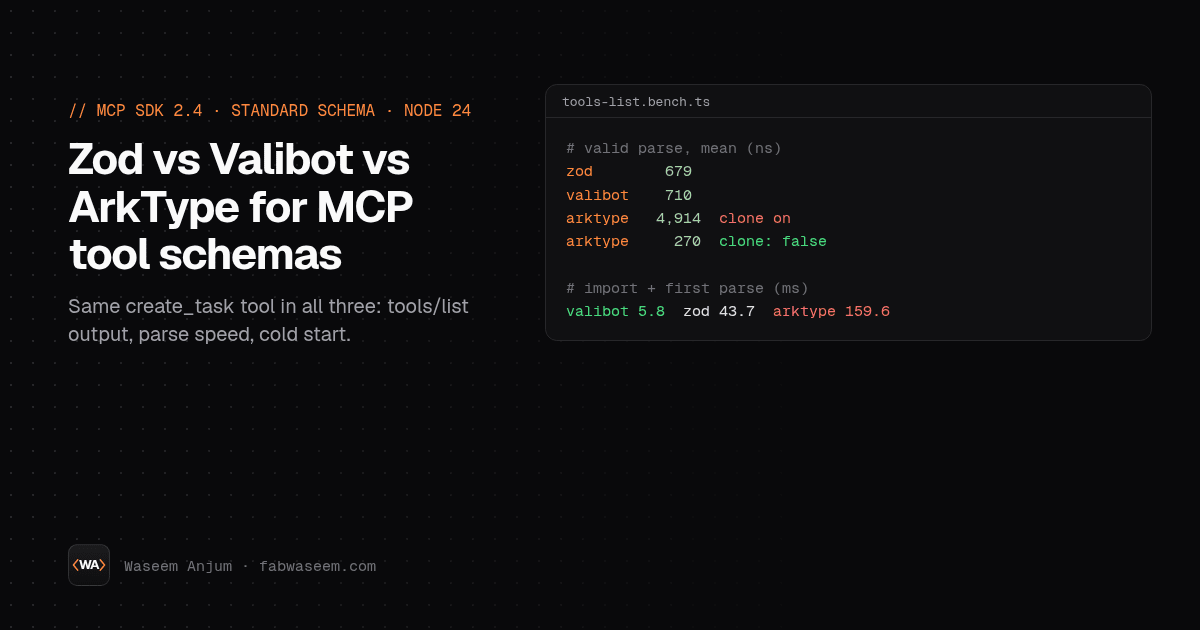
That's the opposite of ArkType's reputation, so I split the schema apart. With no defaults and no formats, ArkType was the fastest by far: 71 ns against Zod's 295 ns and Valibot's 453 ns. Adding the email check took it to 123 ns. Adding .default() on any single field took it to about 4,900 ns.
The cause is cloning. When a schema has morphs (and defaults count), ArkType clones the input before applying them so your original object isn't mutated. You can turn that off:
// arktype.config.ts, imported before anything that imports "arktype"
import { configure } from "arktype/config";
configure({ clone: false });
With clone: false the default-only schema ran at 55 ns, and the full task schema at 270 ns, which includes about 47 ns for the { ...good } spread I added so each call got a fresh object. The trade-off is real: with cloning off, ArkType writes priority: "normal" into the object you passed in. I checked, and the returned value is the same object as the input. For MCP tool args I'm fine with that, since the args object comes straight from the parsed request. I ran the ArkType tool through the MCP client again with clone: false and the handler still got {"title":"x","tags":[],"priority":"normal"}. For shared config objects I'd leave cloning on.
To be fair, even 5 µs per tool call doesn't matter next to an LLM round trip. I only went looking because the number looked wrong.
Cold start and bundle size#
Cold start matters more to me than parse speed, because my MCP servers on Vercel are stateless and build a fresh server per request. I timed import plus first parse in a fresh Node process, 21 runs each, median:
Bundle size, esbuild --bundle --minify --format=esm --platform=browser, entry imports one schema and calls parse once:
Zod and ArkType include JSON Schema output already, so adding the conversion call barely changed their size. Valibot needs the extra package, and it's still the smallest. On a server none of these sizes matter much, but the cold start difference follows the same order.
What I'm doing in my own MCP servers#
I'm keeping Zod in the NestJS server. It's what the MCP and AI SDK examples use, its JSON Schema output was accurate here, and I already know its quirks. Any datetime field I add there gets { offset: true } from now on.
For the next serverless MCP endpoint I build, I'll try Valibot. It had the cleanest tools/list output and the fastest cold start, and the only extra step is one toStandardJsonSchema() wrap.
ArkType I'd pick for hot validation paths outside MCP, where the defaults-clone cost is easy to turn off and I don't care what JSON Schema it emits. For MCP tools specifically, the missing defaults in tools/list put me off.
I only tested one schema shape on one VM. If your schemas are mostly nested unions or recursive types, the order could change, and I'd like to hear what you see. The scripts are small enough to rerun in a few minutes. If you're testing your own server end to end, my notes on testing an MCP server and MCP security cover the rest of what I check before shipping.
Questions
Share


